

Last updated: 3 November 2026,
Quick answer
Use each one for a different job:
Pick the wrong one and you either annoy your audience or waste your effort. This guide explains how each works, where each one breaks down, and how to choose based on what you want to achieve.
WhatsApp Broadcast vs Group vs Channel vs Community: The Differences at a Glance
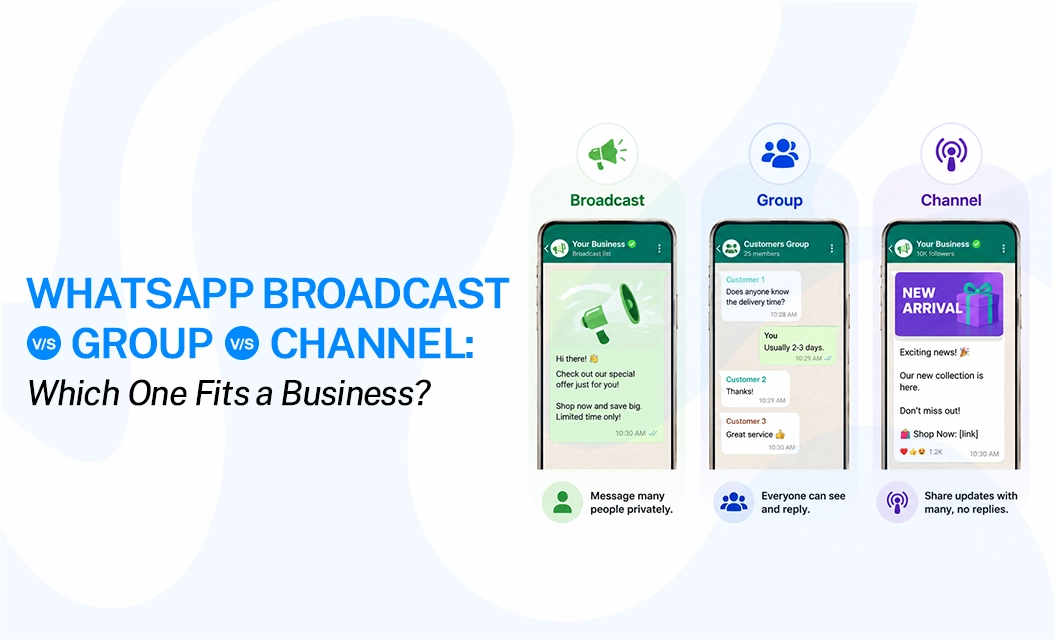
Broadcast list | Group | Channel | Community | |
How people receive it | As a private one-to-one chat | In a shared chat everyone sees | In the Updates tab | Announcements go to everyone, and chat happens in linked groups. |
Can they reply? | Yes, but only you see it | Yes, everyone sees it | No, only reactions | Yes, inside the linked groups |
Can members see each other? Who can receive or join | No Only contacts who saved your number | Yes Anyone you add or invite | No Anyone who follows | Only inside their own group People you invite or who join through a link |
Size limit | 256 per list | 1,024 members | No published cap | 2000, including the subgroups |
What is a WhatsApp Broadcast List, and when should a business use one?
A broadcast list is a saved set of contacts you can message again and again without picking them each time. When you send a message, every person gets it as a normal one-to-one chat. They don't see who else is on the list. If they reply, only you see it.
There is one hard rule. Everyone on the list must have your number saved in their phone. According to the WhatsApp Help Center, people who haven't saved you won't receive the message.
It works well when: A boutique owner tells 150 regular customers about a restock or a consultant sends a monthly note to existing clients. It feels personal because it is a private message.
It breaks down when: your list grows past a few hundred people or your audience hasn't saved your number. At that point you have a scale problem, not a list problem.
Our guide on WhatsApp broadcast limits explains where the ceilings are, and our walkthrough on how to send a WhatsApp broadcast message for business shows the next step.
What does "broadcast group" mean? WhatsApp has no feature called a broadcast group. When people say it, they almost always mean a broadcast list.
What Is a WhatsApp Group and Why Does It Rarely Work for Promotions?
A group is a shared chat room. Everyone added can see the member list, read every message, and reply to the whole group. It is built for conversation, not announcements.
Groups hold up to 1,024 members, but size isn't the real problem for a business. Visibility is. Members can see each other's details, and anyone can jump in with an off-topic question or spam the thread. One unhappy customer can take over the whole chat.
It works well when: a fitness coach runs an accountability group or a local business wants a small feedback circle of customers who genuinely like talking to each other.
It breaks down when: you want to promote something, make an announcement, or keep control of the conversation
What Is a WhatsApp Channel, and How Is It Different From a Broadcast?
A channel is a one-way feed that lives in the Updates tab. Anyone can follow it, even people who have never saved your number. Only admins can post. Followers can react, but they can't reply, and they can't see who else follows.
That makes channels the closest thing WhatsApp has to public publishing. If you want the full setup, read our guide to WhatsApp Channels for business.
It works well when: you share product drops, event updates, tips or news with an open audience that follows you by choice.
It breaks down when: you need personal or transactional messages. A channel can't send one-to-one messages, so order updates, appointment reminders and support replies don't fit.
What Is a WhatsApp Community and How Does It Work?
A WhatsApp community is a parent space that holds several related groups under one roof. Think of a school with one group for each class and one notice board for everyone.
Every community has an announcements group. Only admins can post there, and every member receives it. The linked groups stay separate, so people chat only in the groups they join. Members see other people only inside their own group, not across the whole community.
It works well when: you run a coaching institute with batch-wise groups, a residents' association, or a brand with a small loyal circle split by city or product.
It breaks down when: you want to promote at scale or personalize messages. You can't send one-to-one, trackable messages from a community.
Is a WhatsApp Community the Same as a Broadcast List?
No. A broadcast list sends private one-to-one chats, and only you see the replies. A community is a shared space with groups, where members can see each other inside those groups. One is a way to send. The other is a place to gather.
Broadcast List vs Group: Which Is Better for Customer Communication?
For direct customer communication, a broadcast list is usually better. Customers get the message on their own and don't see who else received it. In a group, everyone joins the same conversation.
Imagine an online store that wants to announce:
"Flat 20% off on selected products this weekend."
A broadcast sends that straight to each customer. A group would turn a simple offer into a public discussion.
Use a group instead when customers need to ask questions in the open, when members help each other, or when the conversation itself is the value.
WhatsApp Channel vs Broadcast: Which Works Better for Marketing?
Both reach an audience, but they do different jobs. A channel is better for ongoing content and building an audience. A broadcast is better when you have a specific audience and a specific action in mind.
Channel post: "5 WhatsApp marketing tips every small business should know."
Broadcast message: "Hi {{1}}, our WhatsApp marketing workshop starts tomorrow at 11 AM. Here's your joining link: {{link}}."
One more thing to keep in mind. Meta says businesses on the WhatsApp Business Platform can send business-initiated messages to customers who have opted in, using approved message templates. If you plan to run campaigns, start by building a consent-based WhatsApp broadcast list.
Which One Should You Choose? A Quick Decision Guide
Start with your goal, not the feature.
If your goal is | What your should be |
If you're sending an offer for a small group of people | Broadcast list |
Send offers or campaigns to a larger, opted-in audience | |
Send an appointment reminder. | Broadcast list for a few contacts, business platform at scale |
Send an order update. | WhatsApp Business Platform |
Let customers discuss a topic together. | Group |
Run separate groups for batches, cities, or products. | Community |
Share regular brand updates or industry content. | Channel |
Connect WhatsApp with your CRM. | WhatsApp Business API |
Automate customer communication | WhatsApp Business Platform |
If you are also deciding between one-time sends and automated sequences, read broadcast vs drip campaign.
When the Free WhatsApp App Stops Being Enough
Broadcast lists, groups, channels, and communities all live inside the free app, and they work well at a small scale. But each one has a wall: a contact limit, a privacy trade-off, or no way to track delivery.
Once you need consistent delivery, opt-in management, automation, or reporting, you need the WhatsApp Business API. With Emovur, you can send a broadcast to numbers you enter, a CSV, or a saved segment. You can use approved templates with variables, schedule the send for later, and decide how repeated numbers in your file are handled. See Emovur's WhatsApp broadcast in action.
Frequently Asked Questions
What is the difference between WhatsApp broadcast and channel?
A broadcast sends direct messages to selected customers, and each person gets it as a private chat. A channel is a one-way feed in the Updates tab that people follow to hear from you regularly.
What is the difference between a WhatsApp Channel and a community?
A channel is a one-way feed that anyone can follow, with no conversation. A community group has several related WhatsApp groups under one roof, with an announcements group for admin updates and chat inside the linked groups.
Is a community the same as a broadcast list in WhatsApp?
No. A broadcast list sends private one-to-one chats to saved contacts, and only you see the replies. A community is a shared space where members join groups and can see each other inside them.
What does "broadcast group" mean in WhatsApp?
WhatsApp has no feature with that name. People usually mean a broadcast list, where one message reaches many contacts as separate private chats. Broadcast group ka matlab aam taur par broadcast list hota hai.
Is a WhatsApp broadcast better than a group for business?
For direct customer communication, usually yes. A broadcast keeps conversations separate, so customers don't see each other. A group is better when interaction between members is the point, such as a course, event or support circle.
Is the WhatsApp Business API the same as WhatsApp broadcast?
No. A broadcast list is an app feature for sending the same message to several contacts. The WhatsApp Business API is a business messaging system that sends approved template messages to opted-in customers and connects with your CRM and other tools.
Reach customers directly with a broadcast! Let people talk in a group, build a public audience with a channel, and organize several groups with a community. When you are ready to send at scale, see Emovur's WhatsApp Business API pricing .
Related Reads:
WhatsApp Business Marketing Messages Templates
WhatsApp Channels for the Indian Business
Best WhatsApp Business API Providers in India
WhatsApp Business API Pricing in India